 Finance
Expenses
Easily manage employees' expenses and keep track of your daily accounts.
Key features
Submit on the go
Submit expenses right from your phone! Whether emailing an expense or uploading a receipt using Odoo's mobile app, never forget to log an expense by submitting receipts on the go, as you collect them!
Less typing, more scanning
Harness the power of OCR. No more wasted time typing in each receipt detail. Odoo scans each receipt and creates an expense record with the total cost and date, so you don't have to.
Four ways to create records
Email, scan, drag and drop, or manual. Add expenses by sending an email using expense codes, scan in a receipt, drag and drop a receipt into the Expenses app dashboard, or manually type in an expense - from your phone or computer!
Every expense, one report
Stop submitting each individual expense. Place all expenses on one expense report with a click. Submitting a single report is easier for everyone; from the employees submitting expenses, the managers approving expense reports, and the ac…
Reimburse or reinvoice in a flash
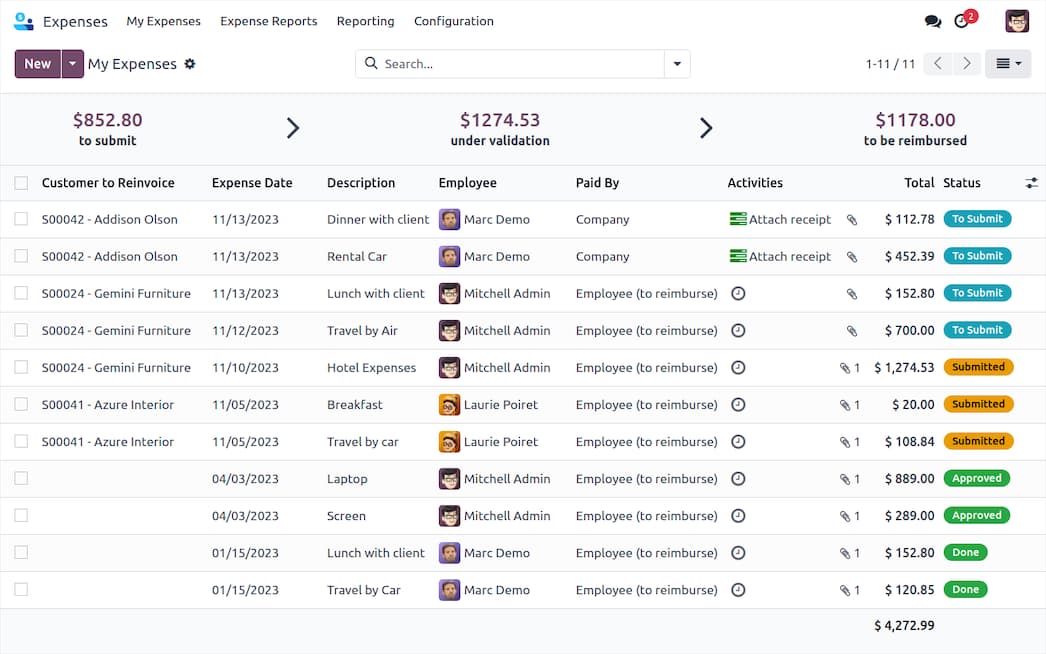
Who should really be paid? Some expenses should be paid for by the client, and others by the business. Specify expenses that should be reimbursed to the employee or reinvoiced to a customer.
See it in action
For your market · Jordan
Expenses for businesses in Jordan
We implement Expenses for Jordanian companies as part of one Odoo system — set up for 16% sales tax and JoFotara e-invoicing, in Arabic and English, with prices in Jordanian dinars.
- JoFotara national e-invoicing (ISTD)
- Quotes and invoices in Jordanian dinars (JOD)
- Support in Arabic and English: +962 79 719 6828
- Ready for Odoo 20 — see what's new


